



10 - Attacking a Player
There are actually two parts to dealing with the player in this design description and the resulting state machine. We have the initial Alerted state, followed by combat itself. For now, we'll start with implementing all the awareness checks and the Alerted state, which acts as a transitional state to the combat behaviours themselves.
First we'll just create the empty Alerted state after the CallRat state with a timeout to send it back to Idle. The template will stop compiling until we add references to it via the awareness checks, but that's fine.
{
  "Sensor": {
    "Type": "State",
    "State": "Alerted"
  },
  "Instructions": [
    {
      "Reference": "Component_Instruction_State_Timeout",
      "Modify": {
        "_ExportStates": ["Idle"],
        "Delay": [10, 15]
      }
    }
  ]
}
There are a number of good components for handling awareness checks. For this we are going to use a handy Sensor component: Component_Sensor_Standard_Detection. To make this work, we'll set up an attitude group (Goblin) that will likely be shared by all other goblins too and references a pre-existing Goblin NPC group. We can detect different NPCs depending on the attitude and react accordingly.
{
  "Groups": {
    "Friendly": ["Goblin"],
    "Hostile": []
  }
}
We don't actually have much in it for now since there aren't many other related NPCs implemented yet, but when there are, we can add any hostiles as hostile. We'll reference this in the parameters and assign it to the attitude group for the ogre, as well as adding a default attitude towards the player (and ignoring most NPCs by default). I'm not really expecting 'friendly' ogres, so I won't bother making the default player attitude a parameter for now.
"Parameters": {
	...
    "AttitudeGroup": {
        "Value": "Empty",
        "Description": "This NPCs attitude group"
    },
	...
},
...
"DefaultPlayerAttitude": "Hostile",
"DefaultNPCAttitude": "Ignore",
"AttitudeGroup": { "Compute": "AttitudeGroup" }
In order to configure 'sight' and 'hearing' on the ogre, we also need to add a few more parameters relating to this.
"Parameters": {
	...
    "ViewRange": {
        "Value": 15,
        "Description": "View range in blocks"
    },
    "ViewSector": {
        "Value": 180,
        "Description": "View sector in degrees"
    },
    "HearingRange": {
        "Value": 8,
        "Description": "Hearing range in blocks"
    },
    "AlertedRange": {
        "Value": 30,
        "Description": "A range within which the player can be seen/sensed when the NPC is alerted to their presence"
    },
    "AbsoluteDetectionRange": {
        "Value": 4,
        "Description": "The range at which a target is guaranteed to be detected. If zero, absolute detection will be disabled."
    },
	...
}
These parameters are pretty self explanatory, but the ViewRange/ViewSector handle how far the ogre can see and his view cone, HearingRange handles how far his hearing extends, and AlertedRange handles how far away the target can go while still being tracked after the ogre has been alerted to their presence. AbsoluteDetectionRange allows us to set a distance at which the Ogre will definitely react to us, regardless of any other conditions.
This Sensor has a few other parameters, for example we can explicitly exclude NPC groups from detection too! But for our purposes, just a simple Attitude filter will work.
Let's talk for a moment about how this works. The sensor has different checks:
- First it checks if there is something in absolute detection range, then if nothing satisfies the filter, it checks further.
- It then checks if there is a potential target in ViewRange/Sector. If there's a target within the view cone and range and there's an unobstructed line of sight to it, then we can 'see' it.
- If the NPC couldn't see anything, it will try to 'listen'. This is a little more specific - if a target is walking or running and isn't crouching, we can 'hear' it, regardless of most other factors (though it won't 'hear' through walls). This makes it pretty perceptive, which is why we tend to use it with a much lower detection radius than the view range.
{
    "$Comment": "Check for any hostile targets in range that could alert the NPC",
    "Sensor": {
        "Reference": "Component_Sensor_Standard_Detection",
        "Modify": {
            "ViewRange": { "Compute": "ViewRange" },
            "ViewSector": { "Compute": "ViewSector" },
            "HearingRange": { "Compute": "HearingRange" },
            "ThroughWalls": false,
            "AbsoluteDetectionRange": { "Compute": "AbsoluteDetectionRange" },
            "Attitudes": ["Hostile"]
        }
    },
	"Actions": [
		{
			"Type": "State",
			"State": "Alerted"
		}
	]
},
{
	"Sensor": {
		"Type": "State",
		"State:" ".Default"
	},
...
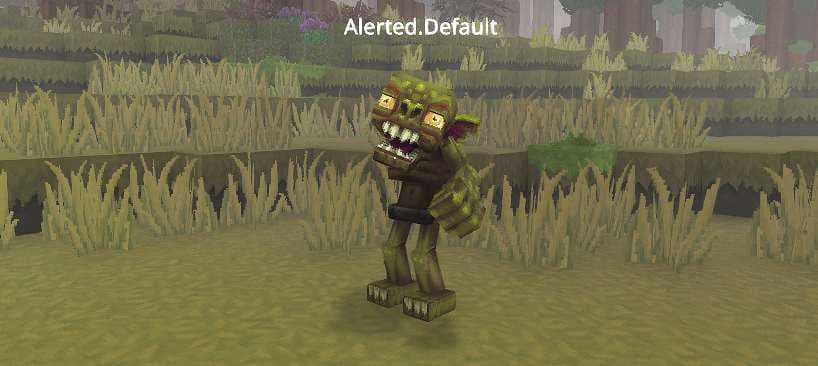
At this point, the template will compile again and we can observe in-game that approaching the ogre in various ways results in it switching to the Alerted state.
We want to add this component to the other idle states too, like sleeping and eating, but we probably want to reduce their detection capabilities a little bit in both cases. Let's add some kind of factor as a parameter.
"Parameters": {
	...
    "DistractedPenalty": {
        "Value": 2,
        "Description": "A factor by which view range and hearing range will be divided when this NPC is distracted"
    },
	...
}
Then we'll use the previous configuration for the CallRat state, but a modified version for both the Sleep and Eat state. Only the Sleep state is shown in this next snippet but the others should follow suit as required. We usually place these checks immediately after any instructions that trigger only Once and Continue (these are basically initialisation instructions).
{
  "Sensor": {
    "Type": "State",
    "State": "Sleep"
  },
  "Instructions": [
    {
      "$Comment": "Check for any hostile targets in range that could alert the NPC",
      "Sensor": {
        "Reference": "Component_Sensor_Standard_Detection",
        "Modify": {
          "ViewRange": { "Compute": "ViewRange / DistractedPenalty" },
          "ViewSector": { "Compute": "ViewSector" },
          "HearingRange": { "Compute": "ViewRange / DistractedPenalty" },
          "ThroughWalls": false,
          "AbsoluteDetectionRange": { "Compute": "AbsoluteDetectionRange" },
          "Attitudes": ["Hostile"]
        }
      },
      "Actions": [
        {
          "Type": "State",
          "State": "Alerted"
        }
      ]
    }
  ]
}
Here we can see a feature we haven't used before - the computed value actually encompasses a computation: we're dividing the ViewRange and HearingRange by the DistractedPenalty to result in a restricted detection radius.
Now, regardless of state, the ogre can react to any threats! Next we'll flesh out the Alerted state a bit so it actually does what's required of it. Let's recap what that was:
- Stand up if seated (this is covered by the state transitions already)
- Roar, ordering nearby goblin scrappers to attack
- Start slowly walking towards the player to attack (we'll consider this part of combat)
In that case, all we need to do here is make the ogre look at its target, play a roaring animation and maybe some particles, and send out a beacon to alert nearby goblin scrappers. First we need a quick NPC group (Goblin_Scrapper) to define goblin scrappers so that we send our beacon to them specifically.
{
  "IncludeRoles": ["Goblin_Scrapper"]
}
We'll add a parameter referencing this too.
"Parameters": {
	...
    "WarnGroups": {
        "Value": ["Goblin_Scrapper"],
        "Description": "The groups to warn when spotting an enemy"
    }
	...
}
And then implement the basic parts of the Alerted state, ending in a transition into a Combat state for combat.
{
	"Sensor": {
		"Type": "State",
		"State": "Alerted"
	},
	"Instructions": [
		{
			"Reference": "Component_Instruction_Play_Animation",
			"Modify": {
				"Animation": "Alerted"
			}
		},
		{
			"Continue": true,
			"Sensor": {
				"Type": "Target",
				"Range": { "Compute": "AlertedRange" },
				"Filters": [
					{
						"Type": "LineOfSight"
					}
				]
			},
			"HeadMotion": {
				"Type": "Watch"
			}
		},
		{
			"Sensor": {
				"Type": "Target",
				"Range": { "Compute": "AlertedRange" }
			},
			"ActionsBlocking": true,
			"Actions": [
				{
					"Type": "Timeout",
					"Delay": [1, 1]
				},
				{
					"Type": "State",
					"State": "Combat"
				}
			]
		},
		{
			"Actions": [
				{
					"Type": "State",
					"State": "Idle"
				}
			]
		}
	]
},
{
	"Sensor": {
		"Type": "State",
		"State": "Combat"
	},
	"Instructions": []
}
There's a fair bit of logic involved, but it's pretty straightforward. We play an animation, then we watch the target as long as there's line of sight to it. We then have a very short delay before switching to the Combat state. We'll handle actually sending the beacon message out to the other goblins using a state transition (and clear the animation at the same time).
{
  "States": [
    {
      "From": [],
      "To": ["Combat"]
    }
  ],
  "Actions": [
    {
      "Type": "PlayAnimation",
      "Slot": "Status"
    },
    {
      "Type": "Beacon",
      "Message": "Goblin_Ogre_Warn",
      "TargetGroups": { "Compute": "WarnGroups" },
      "SendTargetSlot": "LockedTarget"
    }
  ]
}
Before we move on to the actual combat behaviours in the Combat state, there's one more type of awareness check we need to implement: damage. It wouldn't do if a player could just hide away somewhere and snipe at our ogre without him reacting.
We can accomplish this very easily using the Component_Instruction_Damage_Check component, which is designed to assess if the NPC has received damage and respond accordingly. If the target is known and within a reasonable distance, it switches to the combat Chase state, otherwise it switches to a Panic state. Our ogre is pretty tough and has an important job, so we won't actually make him panic - if he takes damage, he's just going to switch to Alerted to warn others nearby and then run in and smash the threat!
Though only one instance is shown in the example, we place this in each of the places where we put the sight/sound checks, and we give it a higher priority by putting it first.
{
    "Reference": "Component_Instruction_Damage_Check",
    "Modify": {
        "_ExportStates": ["Alerted", "Alerted"],
        "AlertedRange": { "Compute": "AlertedRange" }
    }
},
{
	"$Comment": "Check for any hostile targets in range that could alert the NPC",
    "Sensor": {
		...
With that done, our ogre should respond to everything we need it to! Now we can focus on getting it to actually attack its target!