


Hytale Modding
Server Plugins

Formatting the chat

Learn how to format the chat using the PlayerChatEvent and rich text with TinyMessage

Written by oskarscot
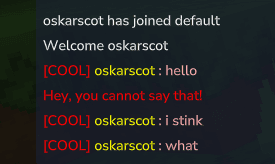
chat format example

The chat uses the PlayerChatEvent, it contains the formatter, the PlayerRef for the sender, the content as well as a list of targets (it's safe to assume the targets is the list of players who can see the chat message) You can cancel this event as well as modify the content and the formatter.

Manual Formatting (Standard Approach)

public class ChatFormatter {

  public static void onPlayerChat(PlayerChatEvent event) {
    PlayerRef sender = event.getSender();
    if(event.getContent().equalsIgnoreCase("poo")) {
      event.setCancelled(true);
      sender.sendMessage(Message.raw("Hey, you cannot say that!").color(Color.RED));
    }

    if(event.getContent().equalsIgnoreCase("you stink")) {
      event.setContent("i stink");
    }

    event.setFormatter((playerRed, message) ->
        Message.join(
            Message.raw("[COOL] ").color(Color.RED),
            Message.raw(sender.getUsername()).color(Color.YELLOW),
            Message.raw(" : " + message).color(Color.PINK)
        ));

  }
}

The formatter is the following interface:

  public interface Formatter {
    @Nonnull
    Message format(@Nonnull PlayerRef playerRef, @Nonnull String message);
  }
}

TinyMessage - Rich Text Formatting (Easy Alternative)

chat format example

TinyMessage is a lightweight, powerful rich text parser for Hytale servers that allows you to use simple tags to create gradients, hex colors, clickable links, and nested styles in chat messages. Similar to minecraft MiniMessage

Features

  • Gradients: <gradient:red:blue>Hello</gradient> or multi-color <gradient:gold:red:black>...
  • Hex Colors: <color:#FF55FF>Custom Colors</color> or <color:red>Named Colors</color>
  • Standard Styles: <b>Bold</b>, <i>Italic</i>, <u>Underline</u>, <mono>Monospace</mono>
  • Clickable Links: <link:https://google.com>Click me!</link>
  • Nested Styling: Tags can be nested indefinitely

Usage Examples

import fi.sulku.hytale.TinyMsg;
import com.hypixel.hytale.server.core.Message;

// Parse a formatted string into a Message
Message message = TinyMsg.parse("<gradient:red:blue>Hello World!</gradient>");
player.sendMessage(message);

// Multiple styles
TinyMsg.parse("<b><color:gold>Bold Gold Text</color></b>");

// Clickable gradient link
TinyMsg.parse("<link:https://example.com><gradient:aqua:blue>Click me!</gradient></link>");

// Complex nested styling
TinyMsg.parse("<b>Bold <i>and italic <color:red>and red</color></i></b>");

// Reset styles mid-text
TinyMsg.parse("<b>Bold <reset>normal text");
public class ChatFormatter {

    private void onPlayerChat(PlayerChatEvent event) {
        PlayerRef sender = event.getSender();
        if (event.getContent().equalsIgnoreCase("poo")) {
            event.setCancelled(true);
            sender.sendMessage(TinyMsg.parse("<red>Hey, you cannot say that!</red>"));
        }

        if (event.getContent().equalsIgnoreCase("you stink")) {
            event.setContent("i stink");
        }

        event.setFormatter((playerRed, message) ->
                TinyMsg.parse("<red>[COOL] </red><yellow>" + sender.getUsername() + "</yellow><pink> : " + message + "</pink>"));
  }
}

Installation

Links:

Github Repository

Github Releases

Curseforge (coming soon)

Installation for server owners:

Download the TinyMessage.jar

Download the latest TinyMessage.jar from the releases page and place it in your server's mods folder.

Installation for developers:

manifest.json

"Dependencies": {
  "Zoltus:TinyMessage": "*"
},

For Gradle

repositories {
    maven { url = uri("https://jitpack.io") }
}

dependencies {
    compileOnly("com.github.Zoltus:TinyMessage:2.0.1") // Use newest version in the repo
}

For Maven

<repositories>
    <repository>
        <id>jitpack.io</id>
        <url>https://jitpack.io</url>
    </repository>
</repositories>

<dependency>
    <groupId>com.github.Zoltus</groupId>
    <artifactId>TinyMessage</artifactId>
    <version>2.0.1</version>
    <scope>provided</scope>
</dependency>

API Reference

TinyMsg.parse(String text)

Parses a string with TinyMsg tags and returns a Message object.

Parameters:

  • text - The string to parse

Returns:

  • Message - A Hytale Message object ready to be sent to players

Supported Tags

TagAliasesExampleDescription
<color:X><c:X>, <colour:X><color:red>text</color>Sets text color (named or hex)
<gradient:X:Y:Z><grnt:X:Y:Z><gradient:red:blue>text</gradient>Creates a color gradient
<bold><b><b>text</b>Makes text bold
<italic><i>, <em><i>text</i>Makes text italic
<underline><u><u>text</u>Underlines text
<monospace><mono><mono>text</mono>Uses monospace font
<link:URL><url:link><link:https://google.com>click</link>Creates clickable link
<reset><r><b>bold<reset>normalResets all formatting

Named Colors

black, dark_blue, dark_green, dark_aqua, dark_red, dark_purple, gold, gray, dark_gray, blue, green, aqua, red, light_purple, yellow, white

License

TinyMsg is available under the MIT License - feel free to use in your projects!